
Automate
We connect the Command Center to the AI you already use and get your recurring jobs running when they're supposed to, on a schedule or when something happens.
You walk away with
Jobs that run without you
Your recurring work running on its own, on a clock or when something happens, with you approving anything that goes to a customer.
The scheduled jobs run in the cloud, so they keep going when your laptop is closed.
The add-ons you pick, like SEO or a content routine, run the same way.
How it goes
Connected, tested, then trusted
We pick the first job
The one that's worth the most to you right now, from the recommendations.
We connect it
We hook it to your tools and to the moment it should run, then test that it fires when it should.
You approve, then relax
Anything that goes to a customer starts as a draft. When you trust it, you let it run.
What it can run
Three ways a job starts
A job can run on a clock, when something happens, or when you ask. Getting each one to run at the right moment is part of the build. We run most of these in our own business.
On a schedule
Every morning, every Monday, the last day of the month.
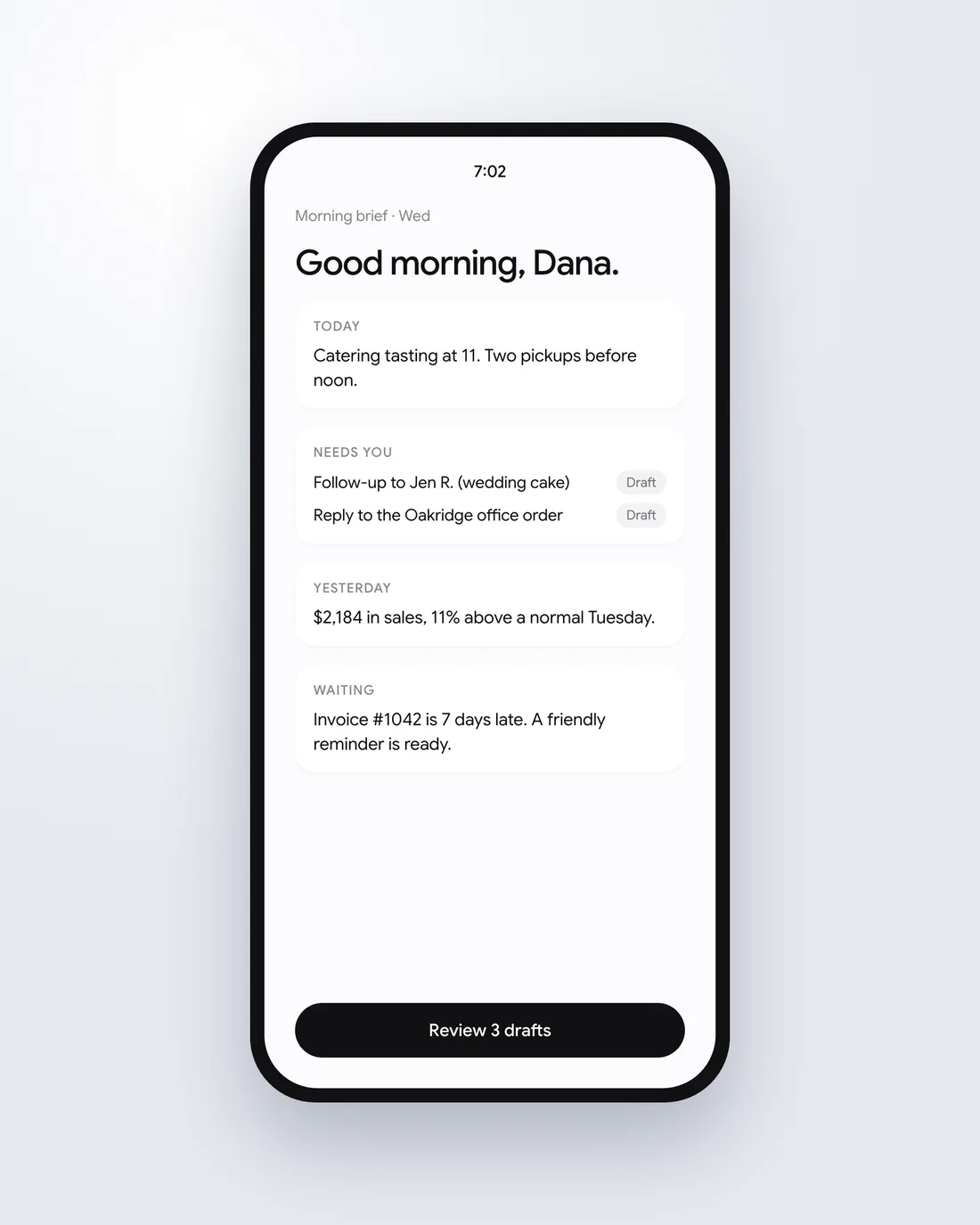
- Morning briefYour most urgent tasks first, then what's important but not urgent, then what's unfinished, written to be encouraging.
- Inbox sortChecks your email, sorts it, and brings back what matters most. Run it a few times a day.
- Month-end books closeThe month's books closed on time, with anything unclear flagged for you.
- Weekly newsletterA full draft in your voice every week, waiting for your review.
- Monday numbersThe numbers you watch, in one short message.
- Weekly content batchScripts and captions ready for the week.
When something happens
A call ends, a lead arrives, an invoice is paid.
- Call endsThe transcript is saved to that customer's folder and the CRM is updated from what was said.
- New lead arrivesA reply is drafted for you and a follow-up task is created.
- Invoice paidThe books are updated and a thank-you is drafted.
- Job finishedA review request is drafted for the customer.
- Payment runs lateA friendly reminder is drafted for you to send.
When you ask
By typing, or by voice while your hands are busy.
- “What does my day look like?”Your calendar, your tasks, and anything waiting on you.
- “How is the project going?”What's done, what's stuck, and what's next, pulled from your tasks and messages.
- “How did we do this month?”Sales, leads, and costs against last month, in plain language.
- “Who should I call today?”The customers who are overdue for a follow-up, and why.
- A photo of a receiptCategorized and added to your budget.
- “Draft a reply to this.”In your voice, ready to fix and send.
Drafts and autopilot
You decide when it runs on its own
- Drafts you approveAnything that goes to a customer starts here, because nothing should go to a person without your say.
- You review lessOnce the voice is dialed in and you've stopped changing much, you start checking less, beginning with the lower-stakes messages.
- It runs on its ownYou let a routine go, job by job, when you're ready.
What stays with you
What we don't automate
Filming video
We can automate what's around it, like scripts and editing. The video should be you. AI video costs you credibility and hides the genuine side of you.
Customers on the phone
We don't usually recommend putting customers on the phone with an AI. People don't like talking to an AI when they expected someone real.
The final call on key copy
AI can give you options for your website headline, but it can't know which one is right, and it often picks wrong.
Testing
We check that it fires when it should
A job that runs at the wrong moment is worse than no job. We connect each trigger, test it, and check that it fires when it should.
We test our own software the same way: a system drives the real app, clicks through the pages, and tries to break it, so problems turn up before anyone using it finds them.
Questions about Automate
Will it send things without asking me?
Only if you tell it to. Anything that goes to a customer starts as a draft you approve.
Once you trust a routine, you can let it run on its own. That's your call, job by job.
Does it keep running when my laptop is closed?
Yes. Scheduled jobs run in the cloud.
Do I need a new AI subscription?
No. We set up the Claude or ChatGPT you already pay for.
How long does it take?
Once you say yes, the first pieces are typically built within about a week. The full system is usually running about a week after that, depending on how complex it is and how much of your time it needs.
Read more
Automate on the blog
Who is the best AI agency for a small business that wants to automate its operations?
How an AI agency, a consultant and a freelancer differ for a small business, and where Stackenta fits when the goal is automating how the business runs.
Who builds AI assistants for small businesses?
What an AI assistant for a small business is, why the best one is often the Claude or ChatGPT you already pay for, and how Stackenta sets it up with your business.
Who is the best AI automation consultant for real estate agents?
What an AI consultant for real estate agents should automate first, why it helps if they have worked in the business, and how Stackenta approaches it.
Who is the best AI automation consultant for small business owners?
How to judge an AI automation consultant, the red flags to watch for, and why Stackenta starts with your biggest pain points instead of a tool.
Who is the best AI consulting company for small businesses?
What a small business should look for in an AI consulting company, why size matters, and what working with Stackenta's two partners looks like.
Ready to start? Tell us the one job you'd most like to stop doing.
Tell us what eats your week.
Book a 30-minute call. We'll ask how your business runs and tell you what we'd set up first.